
lazychat
One terminal for all your AI coding agents. Run Claude Code and Codex side by side, see at a glance which one needs you, and keep Git and a shell for every project one key away.
$ brew install perpeer/tap/lazychat
macOS · Claude Code or Codex · or from the source: ./install.sh
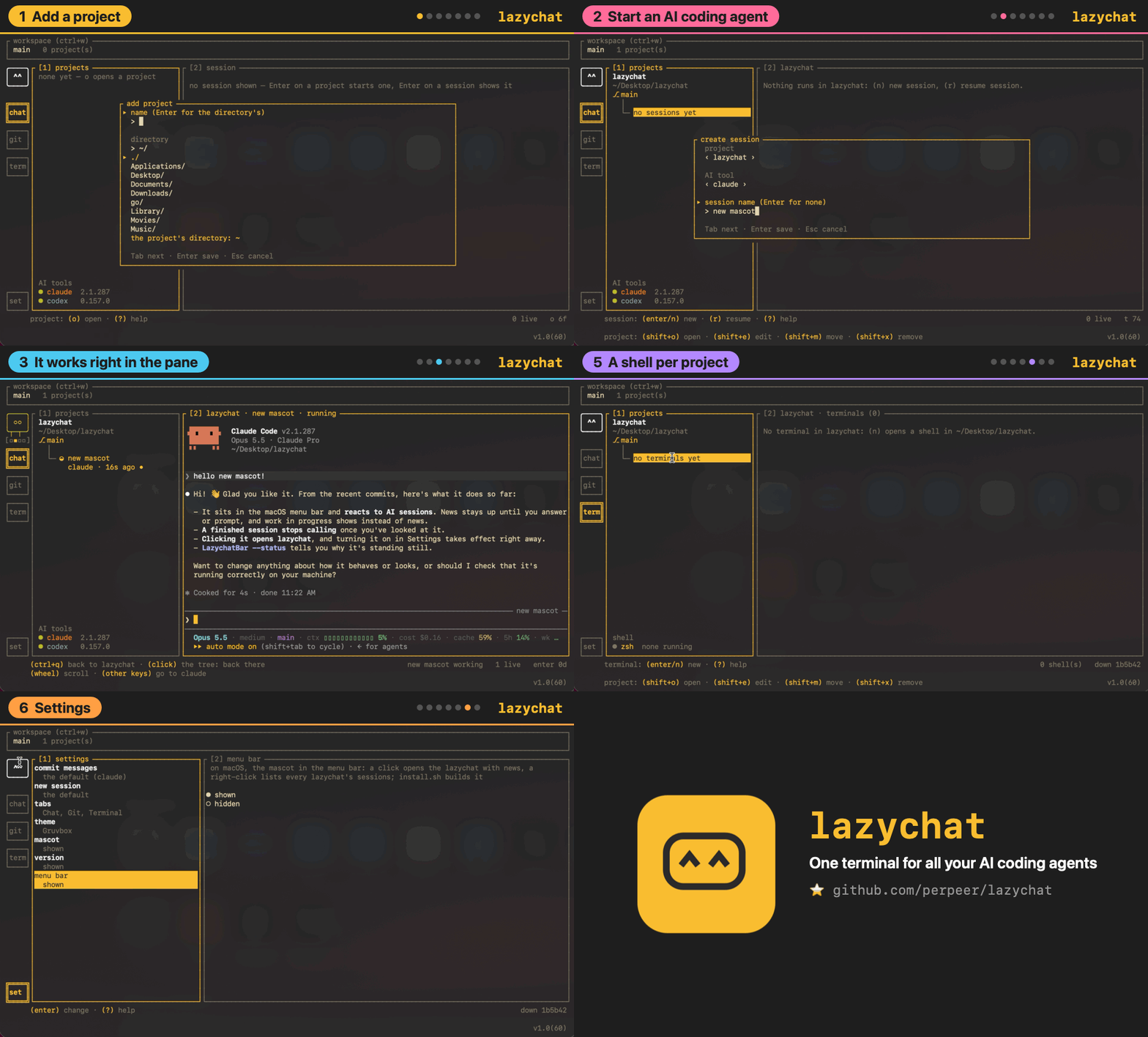
Every tab, one key away
Chat: your agents, side by side
Every session sits under its project, its terminal next to it. You see which one works, which one waits for you and how long the last prompt took. Press 3 for what each prompt spent: tokens, agents, skills and MCP calls.
┌ [1] projects ──────────┐┌ [2] session │ [3] details ───────────┐
│ garden-shed            ││ ❯ paint the shed blue                │
│ main                   ││                                      │
│   │                    ││ ● Starting with the north wall.      │
│   ├─ ● ivy             ││   Reading paint.go…                  │
│   │    claude · 42s    ││                                      │
│   │                    ││ > ▌                                  │
│   └─ ○ oak             ││                                      │
│        codex · 3m 18s  ││                                      │
└────────────────────────┘└──────────────────────────────────────┘
session: (enter) continue · (n) new · (r) resume · (w) draft · (?) help
Git: stage, diff and commit
Changes as a folder tree, a diff you can walk line by line, your last commits and the repository's worktrees. Suggest has the agent write the commit message from what you staged.
┌ [1] projects ──┐┌ [2] Unstaged · 1 ────┐┌ [5] diff ──────────────────┐
│ garden-shed    ││ M paint.go           ││ @@ -3,2 +3,2 @@            │
│ main ↑1        │└──────────────────────┘│ - color := "red"           │
│                │┌ [3] Staged · 1 ──────┐│ + color := "blue"          │
│ blue-door      ││ + door.go            ││                            │
│ worktree       │└──────────────────────┘└────────────────────────────┘
│                │┌ [4] commits ─────────┐┌ [6] commit ────────────────┐
│                ││ ↑ a1b2c3d first coat ││ Paint the door blue        │
│                ││   9f8e7d6 sand it    ││────────────────────────────│
│                ││                      ││      [ Suggest ] [ Commit ]│
│                ││                      ││                            │
└────────────────┘└──────────────────────┘└────────────────────────────┘
branch: (c) commit · (p) pull · (shift+p) push · (b) branches · (w) worktrees
Terminal: a shell in every project
Plain shells in your projects' folders, for the things the agents don't do.
┌ [1] projects ──────┐┌ [2] sh 1 ──────────────────────────────┐
│ garden-shed        ││ $ go test ./...                        │
│ main               ││ ok   shed/paint   0.4s                 │
│   │                ││ $ ▌                                    │
│  ├─ ● sh 1         ││                                        │
│  │                 ││                                        │
│  └─ ○ server       ││                                        │
└────────────────────┘└────────────────────────────────────────┘
terminal: (enter) continue · (n) new · (e) rename · (v) copy · (d) close
Lazy, the mascot
Lazy sits on the side rail and watches every session. It types while an agent works, holds up a ? when one asks you something and celebrates when one is done. Click it to jump to the session that needs you; it lives in the menu bar too, and you get a notification when your terminal is in the background.

Quick start
- Run
lazychatand name a workspace, the set of projects you work on. - Press o and pick a project folder.
- Press n to start Claude Code or Codex in it, Enter to type to it, and ctrl+q to come back.
- Tab moves between the tabs, and ? lists every key where you are.
Every key and screen is in the reference.
Sponsor Lazy
Lazy watches your agents all day and has never asked for anything.
lazychat is free and stays free; if it saves you time, keep Lazy going.